
Meta Custom Audiences from WhatsApp in Kenya
Compare manual customer-list CSV uploads with Timi's automatic WhatsApp audience sync for Customers, qualified leads, no-sale ad chats, disqualified leads, and re-engagement.
4 August 2026 · 7 min read · Timi Labs
You run a weekend Click-to-WhatsApp campaign for a Nairobi furniture shop. By Monday, 180 people have asked about delivery, 35 look serious, and nine have paid by M-Pesa. Your next campaign should treat those groups differently — but today that often means exporting phone numbers, cleaning a spreadsheet, choosing columns, and uploading another customer list in Meta Ads Manager.
Every WhatsApp chat makes your next Meta ad smarter. Timi Audience Autopilot turns live WhatsApp outcomes into useful Meta customer-list audiences without the weekly CSV routine. It is included in Starter, Growth, and Pro — turn it on in Settings → Ad conversion tracking after connecting Meta Ads.
How manual customer-list upload works
Meta Ads Manager lets an advertiser create a Custom Audience from a customer list. A seller or media buyer prepares a CSV with identifiers such as phone numbers, opens the audience workflow, maps the fields, accepts Meta's terms, and uploads the file. Meta hashes identifiers in the browser before upload in supported workflows, then tries to match them to Meta accounts.
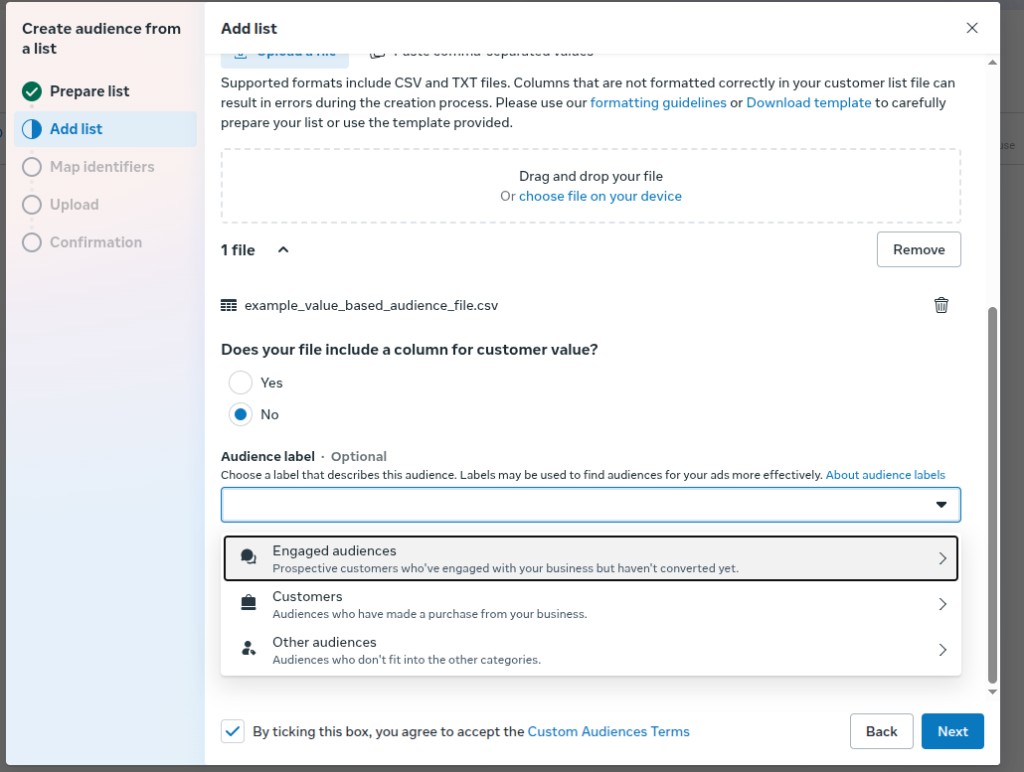
The screenshot shows the practical reality: someone must export the file, format it correctly, select the right source, map identifiers, and repeat the process whenever the list changes. The workflow is useful for an occasional historic list. It becomes fragile when WhatsApp lead status changes every day.
Manual lists drift quickly. Yesterday's promising lead may have paid this morning. A buyer who came from an ad may no longer belong in a "no sale" group. A customer who has been inactive for 90 days may now be ready for re-engagement. A weekly upload freezes all those states at one point in time.
What automatic WhatsApp audience sync changes
Timi uses conversation and sales outcomes already recorded in the seller's account to create and sync five Meta customer-list audiences:
- Customers — people recorded as paid customers.
- Qualified WhatsApp leads — serious buyers whose chats show purchase intent.
- Ad chats no sale — people attributed to a Meta ad chat but not recorded as sold.
- Disqualified leads — cheap ad clicks that stayed at a bare greeting and never showed real buying intent; kept separate so Meta stops optimizing for them.
- Re-engage — eligible past contacts who have gone quiet and may be suitable for a later campaign.
Timi normalizes and cryptographically hashes phone numbers before sending audience membership to Meta. The sync updates membership as a conversation changes, so a paid buyer can leave "Ad chats no sale" and enter "Customers" without another seller export.
Audience Autopilot is included in Starter, Growth, and Pro at no extra Timi fee.
Manual CSV versus automatic sync
The difference is not whether Meta can build an audience — both routes can. The difference is how current and repeatable the audience stays.
- Setup — Manual CSV: export, clean, map, and upload each file. Automatic sync: connect Meta Ads once in Settings and turn on Audience Autopilot.
- Freshness — Manual CSV: accurate only at upload time. Automatic sync: refreshed as Timi processes eligible changes.
- Segmentation — Manual CSV: the seller must define and rebuild every list. Automatic sync: five fixed, understandable business groups.
- Human error — Manual CSV: wrong country codes, duplicate rows, stale filters, or wrong file. Automatic sync: consistent phone normalization and audience rules.
- Campaign control — Both routes leave campaign creation and editing in Meta Ads Manager.
- Legal responsibility — Both routes require the seller to have a lawful basis and comply with Meta's terms.
Manual upload remains a valid fallback for historic customers that are not in Timi or for one-off data migrations. Automatic sync is better suited to active WhatsApp funnels where buyer status changes throughout the week.
How this differs from Conversions API
Customer-list audiences and Conversions API (CAPI) solve different jobs. CAPI reports events such as LeadSubmitted, QualifiedLead, InitiateCheckout, and Purchase for Click-to-WhatsApp ad chats so Meta can measure and optimize outcomes. Audience sync maintains groups of people that an advertiser may include, exclude, or use as a source where Meta permits.
Start with connecting Meta Ads to WhatsApp conversions in Timi. Then understand how Click-to-WhatsApp attribution works and how to read WhatsApp leads in Ads Manager. Audience Autopilot adds a customer-list layer; it does not replace accurate conversion events.
This matters when planning a campaign. You might exclude existing Customers from a new-customer offer, create a separate message for Qualified WhatsApp leads, or review Ad chats no sale before deciding whether to retarget. Those decisions still belong to the seller or media buyer.
Hashed phone data is still personal data
Hashing transforms a normalized phone number into a fixed cryptographic value before transfer. Meta can compare that value with hashes generated from phone numbers it already holds, without Timi sending the plain phone value in the audience payload.
Hashing is a security measure, not anonymization. The data is still personal data because it is used to match a person. Sellers should not describe the process as "anonymous" or assume hashing removes data-protection duties.
Timi acts on the seller's instructions for this sync. The seller's business remains the controller for its customer data and decides whether to use customer-list audiences. That controller role comes with practical responsibilities.
Seller responsibilities in Kenya
Before enabling audience sync, the seller should identify and document a lawful basis under applicable Kenyan data-protection law. Depending on the campaign, relationship, and legal advice, that may involve consent or another valid basis. Timi cannot choose that basis for the seller.
The seller should also:
- Give customers any privacy notice required for advertising use.
- Keep the audience purpose connected to the relationship in which the data was collected.
- Respect objections, withdrawals, opt-outs, deletion requests, and suppression requirements.
- Avoid sensitive targeting or discriminatory exclusions.
- Limit account access to staff or agencies who need it.
- Follow Meta's Custom Audience Terms, Business Tools Terms, advertising standards, and applicable WhatsApp policies.
Uploading a list manually does not avoid these duties. Automatic sync removes repetitive file handling, not accountability.
How to enable Audience Autopilot
- Connect Meta Ads in Settings → Ad conversion tracking (OAuth — same flow as conversion events).
- Turn on Audience Autopilot and confirm you have a lawful basis for customer-list audiences.
- Timi creates the five audiences in your ad account and keeps membership updated as chats change.
You can also review audience status from CRM → Segments. Manual CSV upload in Ads Manager remains available if you need a one-off historic list.
Common mistakes
- Treating a hashed phone list as anonymous data.
- Uploading every WhatsApp contact without documenting a lawful purpose.
- Leaving paid customers inside a "no sale" audience for weeks.
- Assuming Timi will create campaigns or choose budgets.
- Mixing historic CSV contacts with live WhatsApp leads without tracking the source.
- Confusing customer-list audiences with CAPI conversion events.
FAQ
Is Timi Audience Autopilot live today? Yes. It is included in Starter, Growth, and Pro. Connect Meta Ads in Settings, then turn on Audience Autopilot.
Which Timi plans include it? Starter, Growth, and Pro — all paid plans — at no extra Timi fee.
Which audiences will Timi sync? Customers, Qualified WhatsApp leads, Ad chats no sale, Disqualified leads, and Re-engage.
Will Timi edit my ads? No. Timi only creates and updates the five customer-list audiences. Campaigns, budgets, creatives, ad sets, and publishing remain in Meta Ads Manager.
Does hashing remove the need for consent or another lawful basis? No. Hashing protects raw identifiers during transfer but does not make matched audience data anonymous.
Can I keep using CSV uploads? Yes. Manual upload remains available in Meta Ads Manager and may help with historic contacts outside Timi.
Share this guide